

Fabric & Power BI Connector
Get IXON machine data into Microsoft Fabric, ready-modelled, and benchmark your machines in Power BI from day one.
Contact StriData
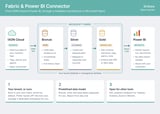
StriData’s Fabric and Power BI Connector loads your IXON Cloud data into Microsoft Fabric and structures it along the medallion architecture that Microsoft recommends. The connector deploys predefined bronze, silver and gold layers, so you spend your time on insights instead of data pipelines.
How it works
Bronze: raw IXON data, landed as-is through the IXON API, with incremental loads and full history
Silver: cleaned and typed tag data, mapped to machines and data sources
Gold: an analysis-ready star schema with machines, tags, alarms and time
Power BI: reports run directly on the gold layer via Direct Lake, with no data import or scheduled refresh
Included from day one
Automated, incremental ingestion of IXON historical data
The complete bronze, silver and gold data model
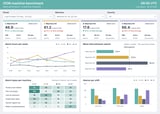
A Power BI machine benchmark report that compares alarm time, mean time between alarms, alarm types and shift performance across your machines
Open access through the Fabric SQL analytics endpoint for Tableau, Grafana, Excel or low-code platforms such as Mendix
Your tenant, or ours
By default, the connector runs in your own Microsoft Fabric tenant. Your machine data stays under your own security and governance, and you can combine it with ERP, MES or service data and extend the model yourself. Prefer not to manage Fabric yourself? We host your data in a dedicated workspace in StriData’s Fabric tenant and manage it for you.
Typical use cases
Benchmark machines against each other and against the fleet average
Spot machines whose performance is degrading before they become a service issue
Find the alarm types and shifts that cost the most time
Share machine insights with your own customers
Requirements
IXON Historical Data module
Microsoft Fabric capacity in your own tenant ([F2] or higher), or hosting by StriData
Power BI licences for report users
How to install
1. Fill in the short intake form: https://forms.cloud.microsoft/e/SvnpdGHuq6
2. We plan a short scoping call to confirm machines, data and hosting.
3. We deploy the bronze, silver and gold layers and the benchmark report, either in your Fabric workspace or in a workspace we host for you.
4. Open Power BI and start comparing your machines.
Questions? Contact us at info@stridata.com.

