
Data Logging Checker
Get a complete overview of the data logging status of your fleet.
Install
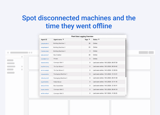
This app allows you to:
For this app, the source code is available on Github.
Please note: this is a Workshop app. Workshop apps are provided 'as-is' and not supported by IXON.
Follow these steps to install:
Step 1: Install the Data Logging Checker component to your company from the marketplace.
The details of the fleet will load immediately.
