

Active Connections
Get a complete overview of VPN, VNC, RDP and SSH connections.
Install
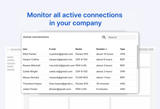
This app allows you to:
For this app, the source code is available on Github.
Please note: this is a Workshop app. Workshop apps are provided 'as-is' and not supported by IXON.
Follow these steps to install:
Step 1: Install the Active Connections component to your company from the marketplace.
Step 2: Navigate to Admin > Apps > Active Connections, click on the three dots and then click “Enable”.
Step 3: Navigate to the Studio and add the component to your page.
Step 4: (Optional) In the component settings, provide a Title (e.g., "Main Fleet Health").
The details of the fleet will load immediately.
